全球主机交流论坛

标题: 今天享受VIP待遇了,VIRMACH手工帮我配置机器了 [打印本页]

作者: sRGB    时间: 2020-12-12 21:47
标题: 今天享受VIP待遇了,VIRMACH手工帮我配置机器了


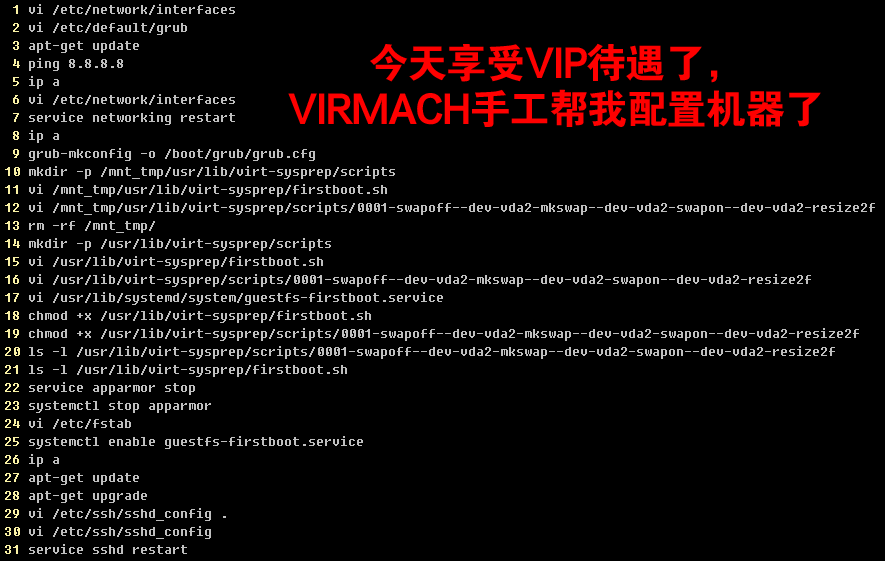
你们新开几机器,有 shell 命令 历史记录吗

  1.     1  vi /etc/network/interfaces
  2.     2  vi /etc/default/grub
  3.     3  apt-get update
  4.     4  ping 8.8.8.8
  5.     5  ip a
  6.     6  vi /etc/network/interfaces
  7.     7  service networking restart
  8.     8  ip a
  9.     9  grub-mkconfig -o /boot/grub/grub.cfg
  10.    10  mkdir -p /mnt_tmp/usr/lib/virt-sysprep/scripts
  11.    11  vi /mnt_tmp/usr/lib/virt-sysprep/firstboot.sh
  12.    12  vi /mnt_tmp/usr/lib/virt-sysprep/scripts/0001-swapoff--dev-vda2-mkswap--dev-vda2-swapon--dev-vda2-resize2f
  13.    13  rm -rf /mnt_tmp/
  14.    14  mkdir -p /usr/lib/virt-sysprep/scripts
  15.    15  vi /usr/lib/virt-sysprep/firstboot.sh
  16.    16  vi /usr/lib/virt-sysprep/scripts/0001-swapoff--dev-vda2-mkswap--dev-vda2-swapon--dev-vda2-resize2f
  17.    17  vi /usr/lib/systemd/system/guestfs-firstboot.service
  18.    18  chmod +x /usr/lib/virt-sysprep/firstboot.sh
  19.    19  chmod +x /usr/lib/virt-sysprep/scripts/0001-swapoff--dev-vda2-mkswap--dev-vda2-swapon--dev-vda2-resize2f
  20.    20  ls -l /usr/lib/virt-sysprep/scripts/0001-swapoff--dev-vda2-mkswap--dev-vda2-swapon--dev-vda2-resize2f
  21.    21  ls -l /usr/lib/virt-sysprep/firstboot.sh
  22.    22  service apparmor stop
  23.    23  systemctl stop apparmor
  24.    24  vi /etc/fstab
  25.    25  systemctl enable guestfs-firstboot.service
  26.    26  ip a
  27.    27  apt-get update
  28.    28  apt-get upgrade
  29.    29  vi /etc/ssh/sshd_config .
  30.    30  vi /etc/ssh/sshd_config
  31.    31  service sshd restart
复制代码

作者: laogui    时间: 2020-12-12 21:49
哈哈,老板手工装系统
作者: 16qf    时间: 2020-12-12 21:49
本帖最后由 16qf 于 2020-12-12 21:53 编辑

就帮你配置了个网卡而已嘛(看错了不是网卡 忙着水贴呢)
作者: yanaxiao    时间: 2020-12-12 21:49
这个去哪里看都不知道。而且说不定是人工智能帮你配的。
作者: wifitry    时间: 2020-12-12 21:49
享受vip待遇了
作者: rooney    时间: 2020-12-12 21:50
这难道做模版时候的记录??
作者: 蓝瘦香菇    时间: 2020-12-12 21:51
老板需要这条命令
  1. echo > .bash_history && history -c
复制代码

这条看老板ip
  1. last
复制代码

作者: sRGB    时间: 2020-12-12 21:51
16qf 发表于 2020-12-12 21:49
就帮你配置了个网卡而已嘛

帮我配置 硬盘分区了, swap设置 256M
自动脚本是 1G swap的
Device     Boot    Start      End  Sectors  Size Id Type
/dev/vda1  *        2048 30930559 30928512 14.8G 83 Linux
/dev/vda2       30930560 31454847   524288  256M 82 Linux swap / Solaris

作者: sRGB    时间: 2020-12-12 21:55
蓝瘦香菇 发表于 2020-12-12 21:51
老板需要这条命令

这条看老板ip

好像母鸡上开的

reboot   system boot  4.19.0-6-amd64   Fri Dec 11 22:47   still running
reboot   system boot  4.19.0-6-amd64   Fri Dec 11 22:46 - 22:46  (00:00)
root     pts/0        10.40.1.50       Tue Oct 22 05:36 - down   (00:27)
root     pts/0        10.40.1.50       Tue Oct 22 05:34 - 05:34  (00:00)
root     tty1                          Tue Oct 22 05:33 - down   (00:30)
reboot   system boot  4.19.0-6-amd64   Tue Oct 22 05:32 - 06:03  (00:30)
root     tty1                          Mon Oct 21 14:02 - down   (15:29)
reboot   system boot  4.19.0-6-amd64   Mon Oct 21 13:27 - 05:31  (16:03)
root     tty1                          Mon Oct 21 12:56 - down   (00:29)
reboot   system boot  4.19.0-6-amd64   Mon Oct 21 12:54 - 13:26  (00:31)

作者: seafood_to    时间: 2020-12-12 21:55
sRGB 发表于 2020-12-12 21:51
帮我配置 硬盘分区了, swap设置 256M
自动脚本是 1G swap的


都是256
作者: lastfree    时间: 2020-12-12 21:56


恭喜。然而。网络还是不行。。。拉跨
作者: 额头有王的喵    时间: 2020-12-12 22:02
再给你埋颗雷嘻嘻
作者: directlinkss    时间: 2020-12-12 22:29
然而我机子依然失联。等他一个月不开我就争议了。
作者: mix    时间: 2020-12-12 22:29
别想太多,模板而已


欢迎光临 全球主机交流论坛 (https://d.168530.xyz/) Powered by Discuz! X3.4